Internet
A Practical Guide to Building Banner Design Assets Read More 12 November, 2026

A brand banner asset is a visual design that shows your brand’s style and identity. Building brand banner assets helps you create a consistent look across your marketing channels. It also helps customers recognize your brand anywhere.
Even so, you need more than a pretty image to make your banners work. You need the right design, size, and message.
In this guide, you’ll learn what banner assets are and what makes them effective. We’ll also cover platform sizes and how to document your design rules.
Quick SummaryBuilding brand banner assets helps you create visuals that customers recognize and trust. Use your logo, colors, fonts, and images to give every banner a clear, consistent look. Choose the right size for each platform and save reusable designs to make future updates quick and easy.
A brand banner asset is a graphic that represents your business across digital platforms. It combines your logo, brand colors, fonts, images, and message.
You can use it on your website, social media pages, emails, and online ads. Its main job is to help people recognize your brand quickly.
When building brand banner assets, aim for more than just a pretty design. Every banner should fit your brand’s true personality. You should also create a simple guide that shows how to use each design element. It keeps your banners and professional content consistent.
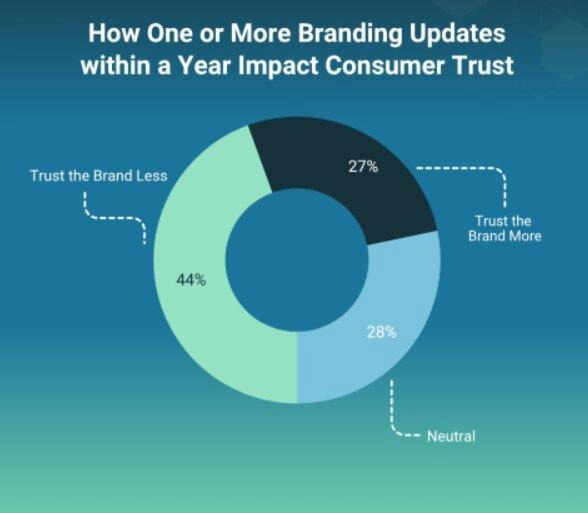
A 2025 Clutch survey also shows why brand consistency matters. It found that 98% of consumers 98% of consumers notice when familiar brands change their look. What’s more, 44% said rebrands make them trust a brand less.
What Does a Brand Banner Asset Mean?A brand banner asset is a reusable graphic that displays your business’s visual identity. It helps people recognize your brand across websites, social media, emails, and ads. Building brand banner assets helps you create consistent visuals across your marketing materials.
The right banner size depends on where you plan to display it. YouTube recommends 2560 × 1440 pixels, while LinkedIn uses 1200 × 628 or 1200 × 1200 pixels. Google Display and IAB ads also follow their own size rules.
When building your banner design, always check each platform’s size rules. The right dimensions help your designs fit without unwanted cuts or blurry images.
Use the table below as a quick guide when creating your assets:
| Channel | Aspect Ratio | Recommended Dimensions | Minimum Dimensions | Source |
| YouTube Channel Banner | 16:9 | 2560 × 1440 px | 2048 × 1152 px | YouTube Help |
| LinkedIn Single Image Ad (Landscape) | 1.91:1 | 1200 × 628 px | 640 × 360 px | LinkedIn Help |
| LinkedIn Single Image Ad (Square) | 1:1 | 1200 × 1200 px | 360 × 360 px | LinkedIn HelpLinkedIn Help |
| Google Responsive Display Ad (Landscape) | 1.91:1 | 1200 × 628 px | 600 × 314 px | Google Ads HelpGoogle Ads Help |
| Google Responsive Display Ad (Square) | 1:1 | 1200 x 1200 px | 300 x 300 px | Google Ads HelpGoogle Ads Help |
| IAB Leaderboard (Fixed Unit) | Not available | 728 × 90 px | 728 × 90 px | IAB SpecificationsIAB Specifications |
Keep these additional details in mind when building brand banner assets:
Always preview your brand banner assets before uploading them. Check how each one looks on mobile, desktop, and larger screens.
How Can You Choose the Right Banner Size for Each Channel?When building brand banner assets, start with each platform’s recommended size. Use 2560 × 1440 pixels for YouTube and 1200 × 628 pixels for LinkedIn landscape ads. For landscape Google Display ads, use 1200 × 628 pixels. IAB leaderboards support 728 × 90 pixels.
Building brand banner assets takes six simple steps. Start by choosing your design software, gathering brand elements, and setting banner sizes. Then, create your layouts, review each design, and document your brand rules.
Here are the steps to follow when building brand banner assets:
Building brand banner assets begins with choosing a design tool like Adobe. Your software should make it easy to create, edit, and reuse designs.
Pick a solution that fits your skills and design needs. Also, check whether your team can access and use it.
Next, gather the visual parts that make your business easy to recognize. These include your brand’s:
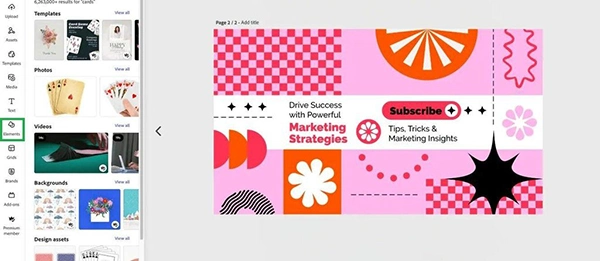
You can also add character design if your brand uses mascots or drawings. Give them a clear, consistent style so customers can spot and remember them.
Always check the image size rules for each platform before building brand banner assets. The right size helps your images look clear. It also keeps key parts from getting cut off. Also, keep important text and logos within safe areas.
Now, arrange your design elements in a clear and simple way. Put your main message where people can spot it quickly. Add your logo and a strong call to action.
Here’s an example of a banner design in Adobe Express:
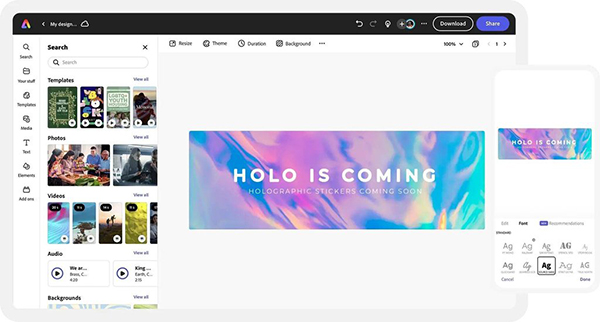
Design reusable versions for different channels and campaign needs. Save editable copies so you can change text and images without starting from scratch. You can also match your banner colors and elements to other brand materials like your digital business card digital business card.
Take a final look at each banner before you share it. Check for typos, low-quality images, and spaces that look out of place. Also, check that your text is clear and easy to read.
Once everything looks good, save each design in the right format. Keep a copy of each original file for future changes. Then, download the banners you plan to use.
Bring all your design rules into one simple document. This acts as your guide when building brand banner assets. Include details such as:
Update this document whenever your brand rules change. Share it with your designers and marketing team, so everyone stays on the same page.
How Can You Create Consistent Brand Banner Assets?To create consistent brand banner assets, start with your brand elements and design tools. Set clear sizes, build reusable layouts, and check every design. Keep all your rules in one spec document and share it with your team.
Brand assets are the visual and written parts that help people recognize your business. They include your logo, colors, fonts, images, slogans, and brand voice. These elements help people recognize your brand across different channels. When building brand banner assets, use them to keep your designs familiar and consistent.
Common brand assets include logos, color palettes, fonts, slogans, product shots, and icons. Mascots, drawings, banners, and ready-made templates count as well. Each asset helps people recognize your brand.
A great banner has a clear message, bold visuals, and readable text. It also shows off your logo, brand colors, and font style. Use clear pictures, leave room between your items, and add a clear call to action.
There is no fixed size for every banner. The best fit depends on your chosen platform. For example, YouTube recommends 2560 × 1440 pixels, while LinkedIn landscape ads use 1200 × 628 pixels. Always check each platform’s rules before building brand banner assets.
LinkedIn suggests 1200 × 628 pixels for landscape single-image ads. For square ads, go with 1200 × 1200 pixels. These sizes help your pictures look clean on any screen. Also, keep your text short and your main message easy to spot.
Building brand banner assets helps you create a consistent and memorable identity. Choose your brand colors, fonts, logo, images, and message. Then, check each platform’s size rules before creating your banners.
Also design reusable templates to save time on future designs and document rules that everyone can follow.
Start by creating a brand asset folder today. Add your logo, color codes, fonts, and favorite images. Use it as your starting point for building brand banner assets.
Email at: all4needyinfo@gmail.com