Guide
How Players’ Physical Condition Is Monitored Between Competitions Read More 21 September, 2026

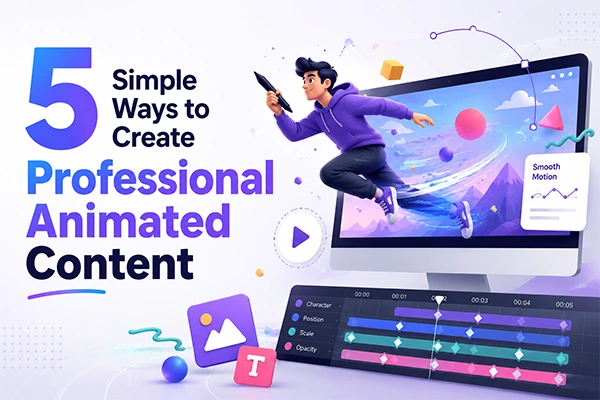
Professional animation no longer requires big budgets. In fact, audiences may care far more about what your video communicates than how much you spent producing it. According to Wyzowl’s 2026 research, 63% of people prefer watching a short video to learn about a product or service.
Fundamentals trump expensive production: a clear story, purposeful motion, consistent visuals, and a format that works wherever your audience watches.
This guide breaks down five simple ways to create professional animated content, from scripting and storyboarding to using animation tools and adapting the finished video for different platforms.
Professional animated content looks clear, moves smoothly, and remains consistent throughout. Polish is less about flashy effects and more about the fundamentals behind those qualities.
Animated video content also rewards conciseness. About 63% of people would rather watch a short video than read about a product, per Wyzowl (2026). Get the fundamentals right, and the result looks professional. The five ways below cover each one in order.
Pen your script and sketch a storyboard before you animate anything. Planning is where professional quality is won. It forces one message and a clear flow. A clip that says five things says nothing well. Brevity also performs: Wistia (2025) found engagement peaks as length drops.
Keep the plan simple:
That strategy is the start of creating engaging animated content. Next comes the motion.
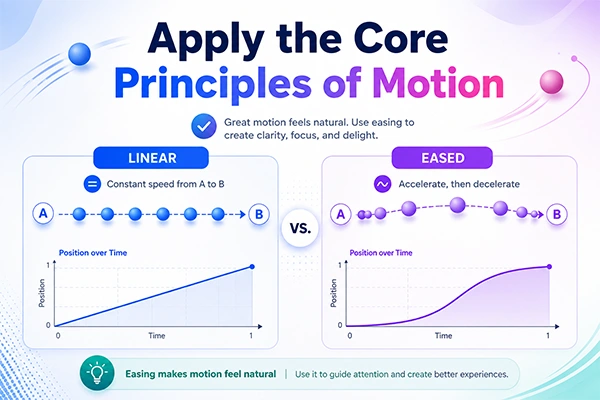
Smooth motion is the clearest sign of professional animated content. It comes from a few timeless tenets. You do not need frame-by-frame skill to use them. You only need to know what the eye expects.
Focus on four:
Handle these four and your motion will feel natural.
Lock one color palette, one or two fonts, and a single style. Reuse them across every scene and video. Consistency is what creates brand-made and intentional content. It is also the fastest way to raise perceived quality.
Treat it like a small brand kit:
Strong character and icon choices carry much of this weight. A little character design thinking goes a long way. Save these one time, and every future clip starts halfway done.
PROFESSIONAL VS AMATEUR ANIMATION
Not the size of your tool budget but a clear message, smooth and natural motion, and a consistent visual style make for professional animated content.
Use a free, browser-based animation maker like Adobe Express to turn a script into a finished clip fast. You pick a character, add a voiceover, and it generates the motion for you. A straightforward clip can be ready in under an hour; a custom explainer takes a day or two.
AI is a big reason this is now easy. Brand use of AI in video jumped from 18% to 41% in a year, per Wistia (2025). AI tools for making animated content handle the heavy lifting, so you focus on the message. A built-in AI video generator can even build scenes from text.
Produce easy-to-watch content for everyone, on any screen. Accessibility is the right call and a quality signal. It widens your audience at no cost, and platform fit does the same.
Cover the basics:
This works for everything from social clips to animated educational content. Build once, adapt per channel, and add a clear title and summary so it is easy to find. For a complete workflow, an all-in-one AI content studio keeps video, audio, and images in one place.
Professional animated content production rewards method over money. Focus on a clear message, natural motion, a consistent look, and the right animation maker. Get those working together and your content will hold its own anywhere. Start with your writing today, then let a good animation maker carry the production. Have a question about creating animated content? Drop it in the comments, and we will answer.
Yes. Free, browser-based animation makers give you templates, characters, and export tools. You can reach professional quality without a subscription or a design background, as long as your message is apparent.
No. Templates, preset motion, and brand kits handle the hard parts. You focus on your message and story instead of frame-by-frame work, so novices can still get polished results.
A brief, template-based clip can take under an hour. A custom explainer with a full script and storyboard usually takes a day or two.
Merely a computer and an internet connection. Browser-based animation makers render in the cloud, so you need no powerful machine or installed software.
Absolutely. Short animated clips work with the sound off and loop well. They hold attention in fast feeds better than static posts, which makes them a strong fit for social.
Save your colors, fonts, and logo in a brand kit. Reuse them in every project so each animation looks like one team made it, video after video.
Add captions, keep movement gentle for sensitive viewers, and use strong color contrast. These small steps widen your audience and signal a professional level of care.
Shorter usually wins. Aim for 15 to 60 seconds on social feeds, and up to two minutes for an explainer. Then cut anything that does not move the story forward.


Email at: all4needyinfo@gmail.com